Redshift, Parquet, and the case of a cup of COPY.
As the CTO of my desk at Twisp, I have a lot of responsibilities. One of them is pretending I’m a world class data engineer. So when I saw messages from data pipeline slowly piling up in a DLQ… I knew it was time to spring into action.
How It Started
Our data pipeline is pretty straightforward:
Dynamo Streams -> Kinesis Firehose -> S3 -> λ to Parquet -> S3 -> λ to Redshift
We essentially store our protobuf-derived data into S3 as Parquet and then issue a plain COPY <table> FROM 's3://...' FORMAT AS PARQUET to ultimately get the data into Redshift. You may have something similar in your data pipeline.
When I looked at the error logs for these messages that were piling into the DLQ… a dreaded error message was discovered:
ERROR: Spectrum Scan Error Detail:
-----------------------------------------------
error: Spectrum Scan Error code:
  15007 context: File 'https://s3.us-east-1.amazonaws.com/bucket/file.parquet' has an incompatible Parquet s query:
  146667179 location: dory_util.cpp:1777 process: worker_thread [pid=30296]
-----------------------------------------------
[ErrorId: 1-68f7ff75-672e60d16356d0f719974665]
Unfortunately Redshift never tells you what is wrong, just that it is wrong!
Diffing the Files
This worked before, so I dumped two representative files - the last good one and the first broken one - and compared the Parquet metadata.
The new file contained an extra field, index_properties_non_cartesian. This was due to adding a new field Index.Properties.non_cartesian to the underlying protobuf schema…
The protobuf schema:
message Index {
  message Properties {
    reserved 5;
    bool unique = 1;
    sint32 buckets = 2;
    bool system = 3;
    bool external = 4;
    bool historical = 6;
    bool asynchronous = 7;
    bool non_cartesian = 8; // <--- Added this
  }

  Migration.State state = 1;
  bytes id = 2;
  Properties properties = 3;
  repeated IndexKey partition = 4;
  repeated IndexKey sort = 5;
  map<string, string> filters = 6;
  repeated string referenced_by = 7;
  google.protobuf.Value schema = 8;
}

message CustomIndex {
  enum OnTable {
    option (twisp.config.v1.enum_gen_options).skip_protoc_gen_go_json = true;
    ON_TABLE_ACCOUNT_UNSPECIFIED = 0;
    ON_TABLE_ACCOUNT_SET = 1;
    ON_TABLE_TRANSACTION = 2;
    ON_TABLE_TRANCODE = 3;
    ON_TABLE_BALANCE = 4;
    ON_TABLE_ENTRY = 5;
  }
  enum Synchronization {
    option (twisp.config.v1.enum_gen_options).skip_protoc_gen_go_json = true;
    SYNCHRONIZATION_SYNCHRONOUS_UNSPECIFIED = 0;
    SYNCHRONIZATION_ASYNCHRONOUS = 1;
  }
  bytes id = 1;
  string name = 2;
  OnTable on = 3;
  Index index = 4;
  Synchronization synchronization = 5;
}
The resulting generated parquet:
message Parquet_Custom_Index {
  required int64 record_begin (TIMESTAMP(MILLIS,true));
  required binary record_rowid (STRING);
  required binary record_status (ENUM);
  required binary record_tenantid (STRING);
  required int64 record_version (INTEGER(64,false));
  required binary id;
  required binary name (STRING);
  required binary on (ENUM);
  required binary index_state (ENUM);
  required binary index_id;
  required boolean index_properties_unique;
  required int32 index_properties_buckets (INTEGER(32,true));
  required boolean index_properties_system;
  required boolean index_properties_external;
  required boolean index_properties_historical;
  required boolean index_properties_asynchronous;
  required boolean index_properties_non_cartesian;
  required binary index_partition (JSON);
  required binary index_sort (JSON);
  required binary index_filters (JSON);
  required binary index_referenced_by (JSON);
  required binary index_schema (JSON);
  required binary synchronization (ENUM);
}
Everything looked right, the non_cartesian property showed up where I expected to, with the types I expected.
I kept banging my head until I read the docs. And something about the syntax jumped out right when I had the columns loaded:
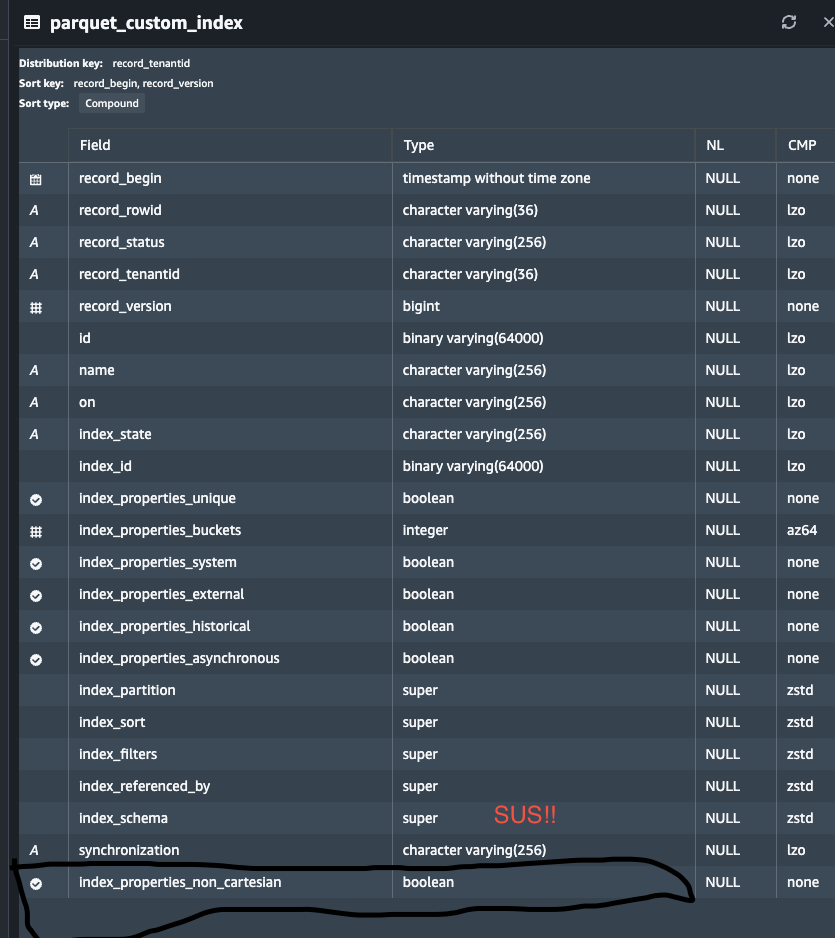
My little voice started to yell at me:
Does Redshift
COPYuse position not name by default???
Fortunately, I’ve used Postgres in anger enough to know how to get the column metadata for a table.. and that ordinal_position would confirm if that column is at the end of my table:
select ordinal_position, column_name, data_type
from information_schema.columns
where table_name = 'parquet_custom_index'
order by ordinal_position;
Now things were coming together:
- Our parquet generator generated the schemas as expected in the same order as the protobuf.
- The Redshift table gained the column through
ALTER TABLE ... ADD COLUMN, and is applied conditionally via a migration.. So it’s ordinal is determined by how the table got into it’s current state. - Redshift’s default COPY without a column list maps Parquet columns by ordinal, not by name.
And finally: Ordinarily (har) when we add a new property in our types, it’s appended to the end of the column list and things just work out.. However in this case, because we were dealing with a nested property on a more complex object, the new field was put on the end of the nested property, so the new column shows up in the middle!
Putting It Right
In order to deal with these situations you gotta lean on the [column-list] capability of the COPY statement to order the columns in the same way as our parquet:
COPY root.parquet_custom_index (
  <columns-in-parquet-order>
) FROM 's3://.../new-file.parquet'
FORMAT AS PARQUET;
Running with this allowed our jobs to succeed and our pipeline can go on it’s merry way!
Lessons Learned
- Adding a column in protobuf doesn’t guarantee it lands at the end of the our generated Parquet files.
- Redshift
ALTER TABLE ... ADD COLUMNappends to the end, so column order only stays aligned if everything else does. - Always pass an explicit column list when loading Parquet into Redshift, especially across schema evolutions.